
Admin Panel
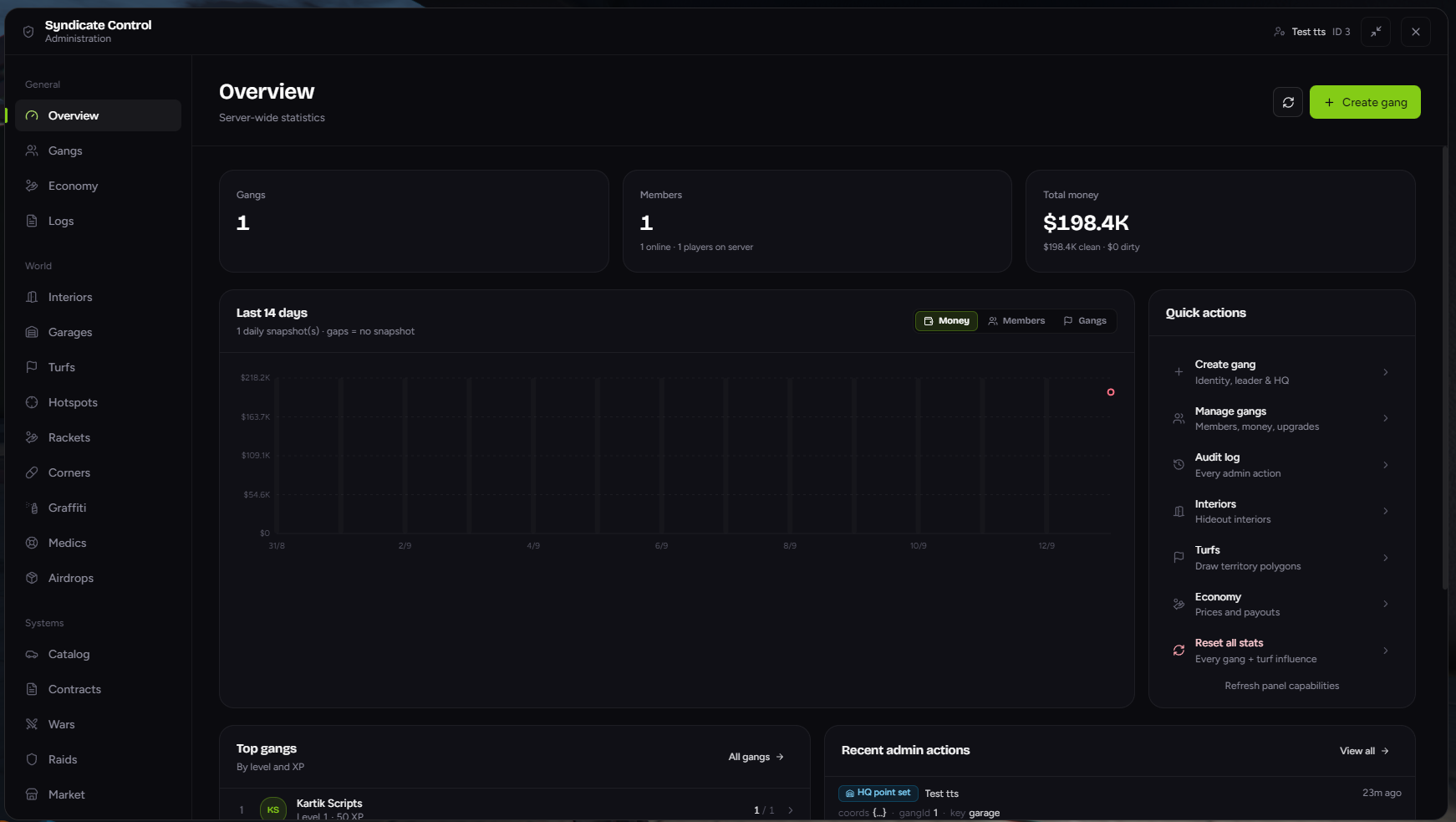
The admin panel is where staff set up and run the whole gang system: creating gangs, drawing turfs, placing garages, managing contracts, wars, raids and more. Changes apply live, with no restarts.
🔓 Opening the panel
Type /gangadmin.
You need admin access. See Admin Access. Anyone else gets "You are not allowed to do this."
🧭 Layout
- Header: 🛡️ Syndicate Control, your name and server ID, a Minimise button and ✕ Close.
- Sidebar: pages grouped into General, World and Systems.
- The panel opens on the Gangs page.
Pages for features that are turned off on your server are hidden automatically.
⬇️ Minimise & Right Shift
Many setup tasks need you to stand somewhere in the world, such as placing a hideout entrance or a medic.
- Press Minimise. The panel hides and you can move freely. A reminder shows at the bottom of the screen.
- Walk to the spot.
- Press Right Shift to bring the panel back. The page you were on, and anything you'd typed, is still there.
- Press Use my position.
Players can rebind Right Shift in Settings → Key Bindings → FiveM ("Restore gang admin panel").
✕ Close fully closes the panel, and unsaved changes are lost.
🧰 Buttons you'll see everywhere
| Button | What it does |
|---|---|
| Use my position | Copies where you're standing, and which way you're facing |
| Teleport | Moves you (or your vehicle) to that point |
| Set waypoint | Puts a GPS waypoint on your map |
| Clear | Removes a point |
| X / Y / Z / H | Coordinates and heading. You can type these directly |
Anything that deletes or resets data asks you to confirm first. Some big actions ask twice.
📚 Pages
General
| Page | What it's for |
|---|---|
| 📊 Overview | Server-wide stats, charts, top gangs, quick actions |
| 👥 Gangs | Create, edit and delete gangs: members, ranks, money, upgrades, hideout |
| 💵 Economy | Upgrade prices and gang XP |
| 📜 Logs | Every admin action |
World
| Page | What it's for |
|---|---|
| 🏚️ Interiors | Hideout interiors gangs can buy |
| 🅿️ Garages | Public crime garages |
| 🗺️ Turfs | Draw turfs and edit influence |
| 🎯 Hotspots | Capture zones and rewards |
| 💼 Rackets | Protection money shops |
| 🕵️ Turf Dealers | Place black market dealers and set what they sell |
| 💊 Corners | Corner selling prices, tuning and per-turf drug zones |
| 🎨 Graffiti | Every tag in the city |
| 🩺 Medics | Black medic locations |
| 📦 Airdrops | Start and stop airdrops |
Systems
| Page | What it's for |
|---|---|
| 🚗 Catalog | The gang vehicle dealership |
| 📜 Contracts | Contract runs and boards |
| ⚔️ Wars | Active wars, requests and history |
| 🚓 Raids | Police raids, approvals and cooldowns |
| 🛒 Market | Moderate market listings |
| 🎟️ Season Pass | Seasons and reward tracks |
| 🪜 Tiers | Tier ladder, locks and promotion requests |
| 🏆 Leaderboard | Weekly and monthly prizes |
| 🎁 Daily Spin | Prize wheel settings and prizes |
⚠️ Things to know
The admin panel overrides config for:
- Upgrade prices and gang XP (Economy)
- Corner selling values and zones (Corners)
- Tiers and locks (Tiers)
- Leaderboard points and prizes (Leaderboard)
- Daily spin settings and prizes (Daily Spin)
- Each gang's plate prefix, paint mode, banner and Discord webhook (Gangs)
- Season name, end date and premium price (Season Pass)
Only read from config on the first start, then managed here:
- Interiors
- Vehicle catalog
- Hotspots
- Medic locations
- Season pass rewards
Read-only here (edit the config files instead):
- Airdrop locations, rewards and schedule
- Contract definitions
Can't be undone:
- Deleting a gang
- Resetting stats or influence
- Clearing all graffiti
- Starting a new season (especially with a level reset)
- Removing a fleet vehicle