
Tebex
Sell extra character slots on your Tebex store. Purchases unlock slots automatically, chargebacks take them back, and every purchase is logged in the admin panel.
⚙️ Setup
- Add your Tebex secret to
server.cfg:
set sv_tebexSecret "your tebex secret"- Turn Tebex on and list your packages with the number of slots each one gives:
Config.Tebex = {
    enabled  = true,
    claim    = true,                  -- players can redeem their tbx- id on a locked slot
    storeUrl = 'yourserver.tebex.io', -- shown on locked slots
    packages = {
        ['1234567'] = 1, -- package id = slots
        ['1234568'] = 3,
    },
}- In each Tebex package, add these game server commands. Replace
<packageId>with the package's id:
| When | Command |
|---|---|
| Purchase | kmc_tebex_slots {id} <packageId> {transaction} |
| Chargeback | kmc_tebex_revoke {id} <packageId> {transaction} |
{id} is the buyer's Cfx.re account, so slots follow the player's account. Players need to be logged in to FiveM/RedM with their Cfx.re account. Each transaction only ever counts once.
🎟️ Player redeem
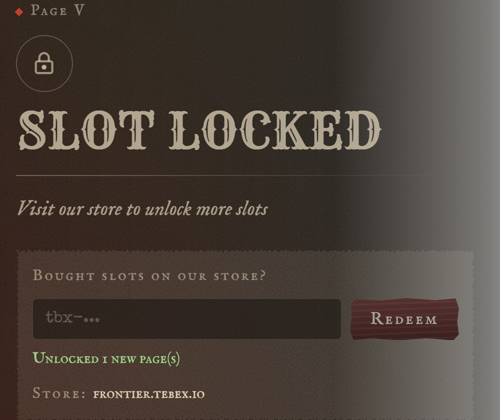
With claim = true, a locked slot shows "Bought slots on our store?". Players paste their tbx- transaction id from the receipt, press Redeem, and the slots unlock straight away. This helps when the purchase command never reached the server, for example while it was offline.
The redeem checks the payment with Tebex: it must be complete, and it only works for the Cfx.re account that bought it. A transaction already delivered can't be redeemed again.
🗂️ In the admin panel
The Admin Panel lists every Tebex purchase, redeem and chargeback, and admins can grant a package to a player by hand.