
Tebex Monetization & Design Credits
kartik-clothing features a built-in token economy allowing server owners to monetize custom garment creation through Tebex webstore purchases.
🌟 How It Works at a Glance
- Every custom garment design submission in
/designstudioconsumes 1 Design Credit. - New players receive a configurable starter credit balance (e.g.,
1free credit). - Players purchase credit packages on your Tebex webstore.
- Tebex automatically fires game server commands upon purchase clearing, adding design credits to the buyer's account (
kc_design_credits). - Double-granting is prevented automatically via unique Tebex transaction ledger checks (
kc_credit_ledger).
🔑 Step 1, Server Secret Setup (server.cfg)
Connect your FiveM server to Tebex using FiveM's native integration. In your server.cfg:
sv_tebexSecret "YOUR_GAME_SERVER_SECRET"[!IMPORTANT] Obtain the key from your Tebex Creator panel under Game Servers → Edit (
creator.tebex.io). Must be a Game Server Key, store/webstore keys will be rejected with HTTP 403.
Verify Connection In-Game
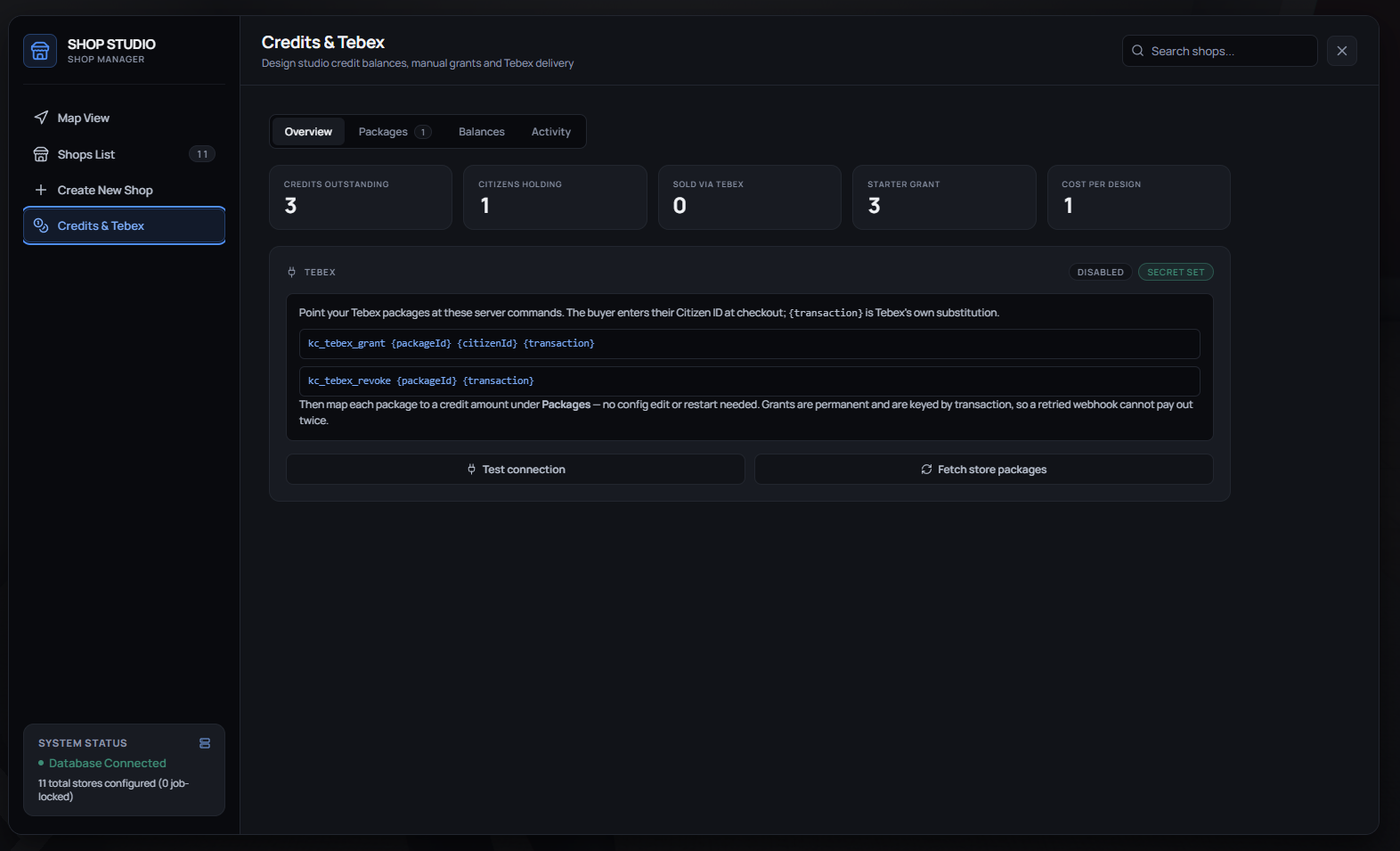
Open the Shop Manager (/shopmanager) and pick Credits & Tebex in the sidebar. The Overview page shows whether Tebex is Enabled and whether sv_tebexSecret is set, and Test connection checks the secret against Tebex. The same page lists the exact grant/revoke commands to paste into Tebex.
🛍️ Step 2, Map Packages in Shop Manager
Before Tebex can deliver credits, map your Tebex Package IDs to credit token amounts:
- Open
/shopmanager➔ Credits & Tebex ➔ Packages. - Press Fetch store packages to pull your package names, ids and prices from Tebex.
- Type the Credits amount into the row for each package that should grant credits (e.g.,
5for package584219). - Press the tick on that row to save it. The bin icon unmaps a package. (Mappings are stored in database table
kc_tebex_packages.)
The Balances page adjusts one player's credits, and Activity lists every credit movement from kc_credit_ledger.
⚙️ Step 3, Configure Tebex Webstore Commands (creator.tebex.io)
In your Tebex Creator Panel (creator.tebex.io), edit the package options and configure Game Server Commands:
1. Delivery Command (On Purchase / Renewal)
Add a command to execute when the buyer completes checkout:
kc_tebex_grant <packageId> {citizenid} {transaction}- Command Settings:
- Execute when: Package is purchased / payment received.
- Run command even if player is offline: Yes (Checked).
[!NOTE]
- Replace
<packageId>with your exact Tebex Package ID (e.g.,584219).{citizenid}is the custom variable field filled by the buyer at checkout.{transaction}is substituted automatically by Tebex for transaction logging and idempotency.
Example Command:
kc_tebex_grant 584219 {citizenid} {transaction}2. Revocation Command (On Refund / Chargeback)
Add a command to execute if a purchase is refunded or disputed:
kc_tebex_revoke <packageId> {transaction}- Command Settings:
- Execute when: Package is refunded / chargebacked.
- Run command even if player is offline: Yes (Checked).
Example Command:
kc_tebex_revoke 584219 {transaction}🔒 Security & Idempotency
- Idempotency Protection: Every Tebex transaction ID is recorded uniquely in database table
kc_credit_ledger. Duplicate webhooks fired by Tebex will not double-grant credits. - Console Execution Only: The commands
kc_tebex_grantandkc_tebex_revokecan only be executed by the server console (source0). Players cannot execute them via chat or client triggers. - Manual Admin Overrides: Admins can grant or take credits in-game from
/shopmanager➔ Credits & Tebex ➔ Balances ➔ Adjust a balance. Enter a Citizen ID and amount, then press Grant or Take (Look up shows the current balance first). Manual adjustments are logged in the ledger with no transaction id.
Custom Garment Designer Studio
The Custom Garment Designer Studio (/designstudio) allows players and creators to draw, texture, bake, and submit custom apparel directly in FiveM.
Tattoos & Barber System
Customize body tattoos, hairstyles, facial hair, makeup, lipstick, and face paint in dedicated barber and tattoo parlor menus.