
Configuration
Everything lives in shared/config.lua. Most things players see can also be changed in game, this file sets the rules and the defaults.
⚙️ General
Config.AdminAce = "command"             -- Who can save the server default HUD
Config.AllowPlayerCustomisation = true  -- false = players get the server default and can't open /hud
📋 Menu
Config.Menu = {
    command     = "hud",
    editCommand = "hudedit",
    keybind     = { enabled = false, defaultKey = "F7" },
}
🎬 Cinematic mode
Config.Cinematic = {
    enabled = true,
    command = "cinematic",
    keybind = {
        enabled    = true,   -- Registers a rebindable key
        defaultKey = "",     -- "" = unbound until the player sets one
    },
}
Players choose the black bars and their size in /hud → General.
🚘 Vehicle controls
Config.VehicleControl = {
    enabled = true,
    command = "vehcontrol",   -- "" = no command
    keybind = {
        enabled    = true,
        defaultKey = "F6",
    },
    passengers       = "own", -- "own" | "all" | "none"
    seatSwapMaxSpeed = 3.0,   -- m/s
    blockedClasses   = { [8] = true, [13] = true, [21] = true }, -- Motorcycles, bicycles, trains
}
passengers | |
|---|---|
"own" | Passengers can use their own door and window |
"all" | Passengers can use every door, window, the hood and trunk |
"none" | Only the driver can use the menu's controls |
The engine and the roof are always driver only, and anyone can move to a free seat. Every door, window and roof request is checked on the server, so players can't open doors of a car they aren't in.
Changing defaultKey only affects players who haven't had the key yet. FiveM keeps each player's own binding.
🛠️ HUD Builder
Config.Builder = {
    enabled      = true,
    command      = "hudbuilder",
    ace          = "command",   -- Who can open the builder
    playerChoice = true,        -- false = everyone gets the default design, no picking in /hud
}
⏱️ Update rates
How often data is sent to the HUD, in milliseconds. Lower is smoother and costs more.
Config.UpdateRates = {
    player   = 250,   -- Health, armour, needs, money, voice
    vehicle  = 60,    -- Speed, rpm, gear, fuel...
    location = 400,   -- Street, zone, postal, speed limit
    compass  = 50,
    weapon   = 100,   -- Only while armed
}
🕒 Clock
Config.Clock = "game" shows in-game time, "real" shows the player's local time.
🙈 Hiding
Config.HideDefaultComponents = { 1, 2, 3, 4, 6, 7, 8, 9, 13, 17, 20 }  -- GTA HUD parts hidden while the HUD is up

Config.HideWhen = {
    pauseMenu       = true,
    cinematicCamera = true,
    dead            = false,
    inventoryOpen   = true,   -- LocalPlayer.state.invOpen (ox_inventory / qb-inventory)
}
🗺️ Minimap
Config.Minimap = {
    enabled          = true,   -- false = leave the minimap alone
    hideHealthArmour = true,   -- Remove GTA's health / armour bars under the map
    offset           = { x = 0.0, y = 0.0 },  -- Fine-tune if the map sits a pixel off
    -- shapes = { ... }        -- Native layout per shape; rarely needs changing
}
🚗 Vehicles
| Setting | |
|---|---|
Config.ShowSpeedometerAsPassenger | Show the speedometer to passengers too |
Config.ElectricVehicles | Models that always use the electric speedometer. Cars the game marks as electric are detected too |
Config.EvRangeKm | Range of an electric car on a full battery, in km (default 480). EV speedometers show battery × this as the range left |
Config.VehicleKindOverrides | Force a HUD type per model: car, bike, boat, submersible, air, bicycle, train |
Config.MetroModels | Trains that use the Transit display |
Config.StallSpeed | Aircraft stall warning speed (m/s) |
Config.EngineWarningAt | Engine health (0–100) for the engine warning |
Config.LowFuelAt | Fuel (0–100) for the low fuel warning |
📺 In-car screen
A screen on the dashboard that shows the player's own speedometer style, the speed limit, clock, street and fuel or battery. It appears in first person, and the matching HUD parts step aside while it is in view. The screen is local: only the people in the car see it.
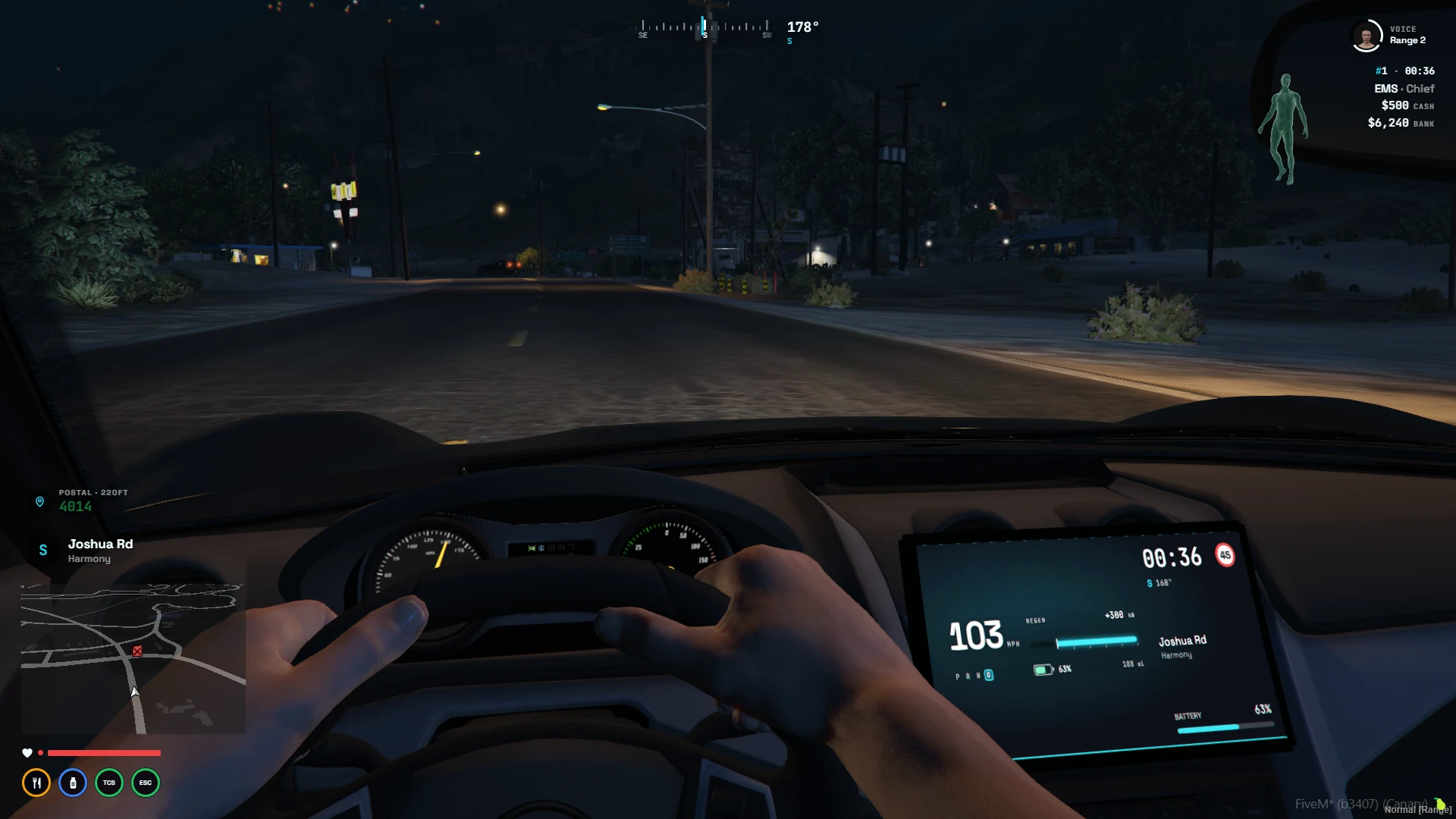
Config.DashScreen = {
    enabled          = true,
    command          = "dashscreen",       -- Player on / off toggle
    adjustCommand    = "dashscreenadjust", -- Live positioning tool
    saveAce          = "command",          -- Who may save positions for everyone
    firstPersonOnly  = true,
    passengers       = true,
    hideOverlay      = { "speedometer", "vehicleStatus", "speedLimit" }, -- {} keeps the whole HUD

    auto = { ... },                        -- Automatic placement, see below
    noScreenClasses = { [8] = true, [13] = true, [14] = true, [15] = true, [16] = true, [21] = true },
    models = {
        [`neon`] = { offset = vec3(0.44, 0.62, 0.33), rotation = vec3(-24.0, 0.0, 1.0) },
        -- [`blista`] = false,             -- No screen in this model
    },
}
Where the screen goes, first match wins:
- Saved in game: sit in the car, run
/dashscreenadjust, move it into place and press Enter. Players withsaveAcesave it for everyone (stored indata/dashscreen.json, applied live). R goes back to the automatic position. models: per-model lines. Players withoutsaveAceget a ready-made line copied when they press Enter.- Automatic: on the car's centre line, level with the steering wheel, tilted to face the driver's eyes.
| Adjust key | |
|---|---|
| Arrows | Move left / right / forward / back |
| PgUp / PgDn | Up / down |
| Numpad 8 / 5 | Tilt |
| Numpad 4 / 6 | Turn |
| Shift | Fine steps |
| Enter | Save (or copy a config line) |
| R | Automatic position |
| Backspace | Done |
While adjusting, an orange outline shows where the screen is even if the dashboard hides it. Bikes, bicycles, boats, aircraft and trains never get a screen.
🪢 Seatbelt
Config.Seatbelt = {
    provider = "auto",   -- "auto" | "qbx_seatbelt" | "kartik-mechanic" | "internal" | "none"
    warningInterval = 15, -- Seconds before the first unbuckled / no-helmet chime, and between chimes
    internal = {
        key                 = "B",
        ejectSpeedUnbuckled = 20.0,  -- m/s
        ejectSpeedBuckled   = 60.0,  -- m/s
        disableExit         = true,  -- Block leaving the vehicle while buckled
    },
    noSeatbeltClasses = { [8] = true, [13] = true, [14] = true, [15] = true, [16] = true, [21] = true },
}
🚦 Cruise control & indicators
Config.CruiseControl = { provider = "auto", key = "Y" }  -- "auto" | "qbx_smallresources" | "internal" | "none"

Config.Indicators = {
    enabled    = true,
    left       = "LEFT",
    right      = "RIGHT",
    hazards    = "UP",
    autoCancel = true,   -- Cancel after the turn
}
😰 Stress
Config.Stress = {
    enabled       = true,
    disableForLEO = true,
    speeding = { enabled = true, minSpeed = 50.0, minSpeedUnbuckled = 30.0, interval = 10000, amount = { 1, 3 } },
    shooting = { enabled = true, chance = 0.1, amount = { 1, 3 }, whitelistedWeapons = { ... } },
    effects  = { ... },   -- Screen effects per stress level
}
Replaces the stress handling of qbx_hud / qb-hud, their events still work, see Events.
✨ Custom statuses and buffs
Config.CustomStatuses = {
    max        = 48,   -- Most statuses that can exist at once
    updateRate = 50,   -- ms between UI updates while any exist

    -- Statuses that exist from the start; scripts then only call setStatusValue
    presets = {
        -- nitro = { label = "Nitro", icon = "flame", color = "#22d3ee", value = 0, context = "vehicle", mode = "auto", autoShow = "notEmpty", order = 75 },
    },
}
Presets take the same options as registerStatus. See Custom Statuses & Buffs.
📮 Postals
Config.Postals = {
    enabled  = true,
    file     = "data/postals.json",   -- The postal map
    commands = { "postal", "p" },     -- {} for no navigation commands
}
The nearest postal is built in, no other resource needed. data/postals.json is the "New and Improved" postal map from nearest-postal. To use another map (old, OCRP…), drop its .json in data/, point file at it and add it to files in fxmanifest.lua. Format:
[{ "x": 0.0, "y": 0.0, "code": "100" }]If the nearest-postal resource is running, its codes are used instead so the HUD always matches it, and it keeps its own /postal command.
🔔 Notifications
Config.Notifications = {
    provider = "ox_lib",   -- "ox_lib" | "custom" (edit bridge/notification/client/notification.lua)
    title    = "HUD",
    duration = 4000,
    position = "top-right",
}
🔒 Switchable options
Config.Options controls every style players can pick. For each option:
allowed:"all", or a list of ids players may choose fromdefault: what new players start withlocked:trueforces the default on everyone (shown greyed out in/hud)
Config.Options = {
    theme           = { allowed = "all", default = "signal",   locked = false },
    panels          = { allowed = "all", default = "floating", locked = false },
    weapon          = { allowed = "all", default = "signal",   locked = false },
    status          = { allowed = "all", default = "signal",   locked = false },
    statusShape     = { allowed = "all", default = "rounded",  locked = false },
    speedometer     = { allowed = "all", default = "signal",   locked = false },
    motorcycle      = { allowed = "all", default = "car",      locked = false },
    evSpeedometer   = { allowed = "all", default = "volt",     locked = false },
    boatSpeedometer = { allowed = "all", default = "helm",     locked = false },
    speedLimitSign  = { allowed = "all", default = "us",       locked = false },
    aircraft        = { allowed = "all", default = "analogue", locked = false },
    bicycle         = { allowed = "all", default = "cadence",  locked = false },
    train           = { allowed = "all", default = "transit",  locked = false },
    units           = { allowed = "all", default = "mph",      locked = false },
    mapShape        = { allowed = "all", default = "square",   locked = false },
}
Example, only allow three speedometers and default to Redline:
speedometer = { allowed = { "signal", "vector", "ember" }, default = "ember", locked = false },All ids are listed in Styles.
🧾 Default settings
Config.DefaultSettings sets other starting values for players who haven't customised their HUD, for example:
Config.DefaultSettings = {
    general = {
        timeFormat = "24h",               -- "24h" | "12h"
    },
    -- When each map element shows: "always" | "vehicle" | "foot" | "never"
    map = {
        minimap     = "always",
        compass     = "always",
        location    = "always",           -- Street name and area
        postal      = "always",
        postalStyle = "widget",           -- "widget" (own panel) | "inline" (on the street name line)
        frameWidth  = 0,                  -- Outline around the minimap in px, 0-6 (0 = none)
        frameColor  = "",                 -- Outline / glow colour, "" = the theme accent
        frameShadow = "none",             -- "none" | "shadow" | "glow"
    },
    waypoint = {
        mode          = "always",         -- Distance to the waypoint (only while one is set)
        color         = "#a44cf2",        -- Also recolours the GPS route and waypoint blip
        compassMarker = true,             -- Mark the waypoint on the compass
    },
    info = {
        idStyle     = "hash",             -- Server ID: "hash" (#12) | "label" (ID 12) | "badge"
        moneyFormat = "full",             -- "full" ($1,250,000) | "short" ($1.25M)
        icons       = false,              -- true = wallet / bank icons instead of the words
    },
    voice = {
        style = "ring",                   -- Mic indicator: "ring" | "bars" | "dot" | "minimal"
        label = true,                     -- TALKING / range text beside the indicator
    },
}| Setting | Values | What it does |
|---|---|---|
map.frameWidth | 0 to 6 | Outline around the minimap, in pixels. 0 = no outline |
map.frameColor | hex colour or "" | Outline and glow colour. "" = the theme accent |
map.frameShadow | "none", "shadow", "glow" | Drop shadow or coloured glow around the minimap |
info.idStyle | "hash", "label", "badge" | How the server ID reads: #12, ID 12, or the number on an accent badge |
info.moneyFormat | "full", "short" | $1,250,000 or $1.25M (amounts under $10,000 always show in full) |
info.icons | true / false | Wallet and bank icons instead of the words "cash" and "bank" |
voice.style | "ring", "bars", "dot", "minimal" | Mic indicator: segmented range ring (with headshot), range bars, a dot that grows with range and pulses while talking, or just the mic and range number |
voice.label | true / false | The TALKING / range text beside the indicator |
The minimap frame is drawn around the outside of the game map, so it never covers it, and it follows the map's shape (rounded square or circle).
Older configs with map = { onlyInVehicle = true } (and compassOnlyInVehicle / locationOnlyInVehicle) still work, they're converted to "vehicle" / "always" automatically.
Priority: built-in defaults → Config.DefaultSettings → Config.Options defaults → the admin-saved server default (/hud → General → Save as server default). Locked options always win.