
Permissions
/emsadmin → Staff → Permissions
A grid of every job grade against every permission. Tick what each rank may do.
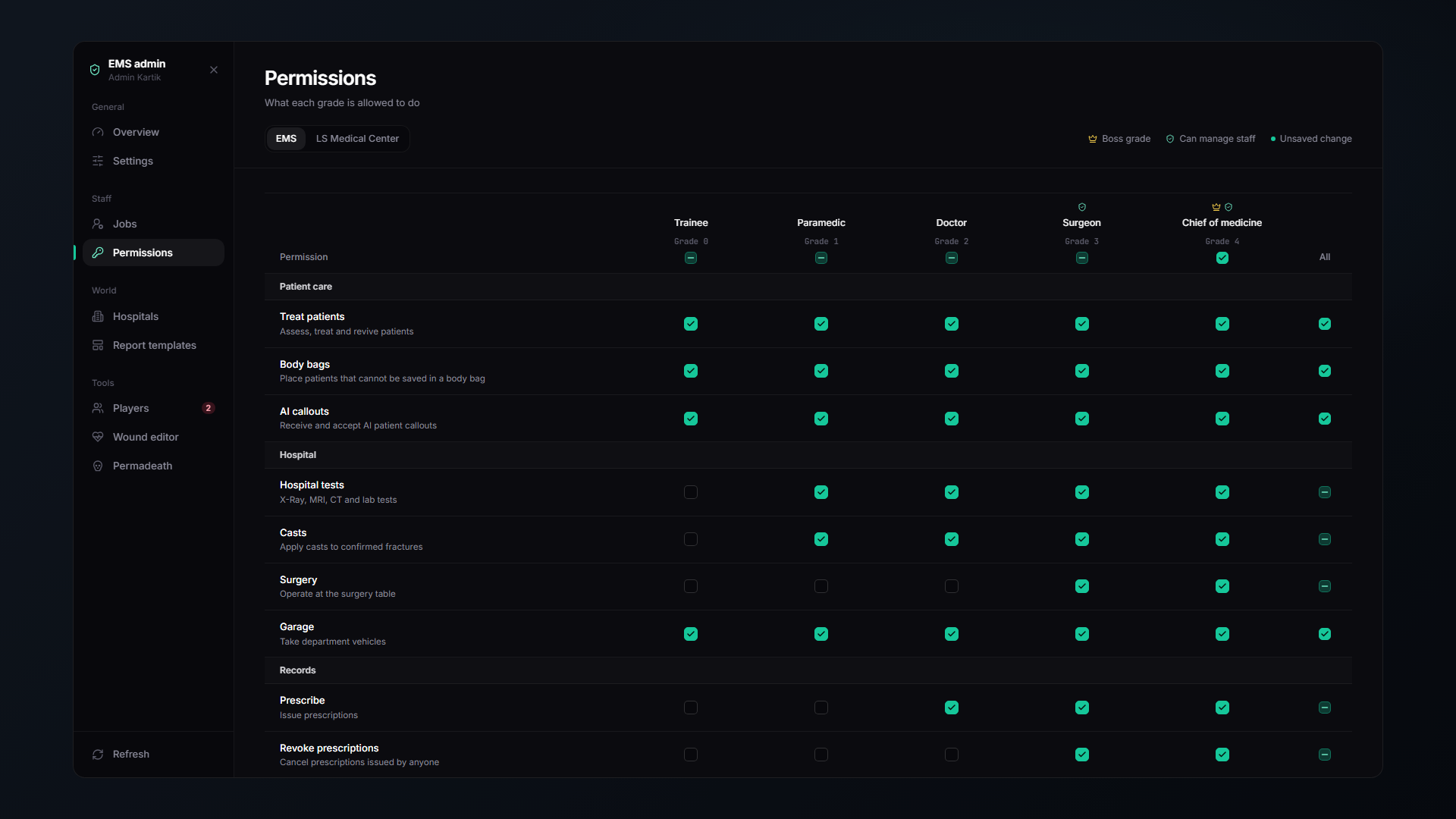
The matrix
Rows are your job's grades, columns are permissions. Click to toggle.
Changes apply instantly to everyone online, no restart, no relog.
Every permission
Patient care
| Permission | Default | |
|---|---|---|
| Treat patients | 0 | Assess, treat and revive patients |
| Body bags | 0 | Bag patients who could not be saved |
| Mobility orders | 0 | Change or lift a patient's crutch / wheelchair orders, see Mobility Orders |
| AI callouts | 0 | Receive and accept AI patient callouts |
| EMS Academy | 0 | Run training scenarios on a mannequin patient |
| Advanced airway | 1 | Intubate patients |
| Chest decompression | 1 | Needle-decompress a tension pneumothorax |
Hospital
| Permission | Default | |
|---|---|---|
| Hospital tests | 1 | X-Ray, MRI, CT and lab tests |
| Casts | 1 | Apply casts to confirmed fractures |
| Chest procedures | 2 | Chest drains and pericardiocentesis |
| Surgery | 3 | Operate at the surgery table, and skin grafts |
| Garage | 0 | Take department vehicles |
Forensics
| Permission | Default | |
|---|---|---|
| Examine bodies | 1 | Examine dead bodies and collect DNA |
| Autopsy | 3 | Perform autopsies at the morgue |
| Certify deaths | 3 | Issue death certificates for identified bodies |
Records
| Permission | Default | |
|---|---|---|
| Prescribe | 2 | Issue prescriptions |
| Revoke prescriptions | 3 | Cancel prescriptions issued by anyone |
| Edit records | 0 | Add notes and edit patient profiles |
| Delete records | 4 | Delete medical records |
| Write reports | 0 | Write medical reports and certificates |
Management
| Permission | Default | |
|---|---|---|
| Report templates | 3 | Create and edit report templates |
| Insurance plans | 4 | Create and price insurance plans |
Managers editing their own department
Every enabled job has a manager rank. Medics at or above it can edit the permissions of grades below them, from the EMS tablet, Staff & permissions.
This is how you get out of the way. Give the Chief the manager rank and they run their department without needing you.
New permissions from updates
When an update adds a permission, every grade at or above its default rank gets it once, on the first start. After that it is yours to change. Nobody is locked out of a new feature, and nothing you already set is touched.
Unknown permissions
If a permission key is not one the resource knows about, it is not restricted. Updates that add new permissions never accidentally lock anyone out.