
Misc
This config file controls how the MDT behaves, which jobs are supported, and what tools are enabled for officers and EMS.
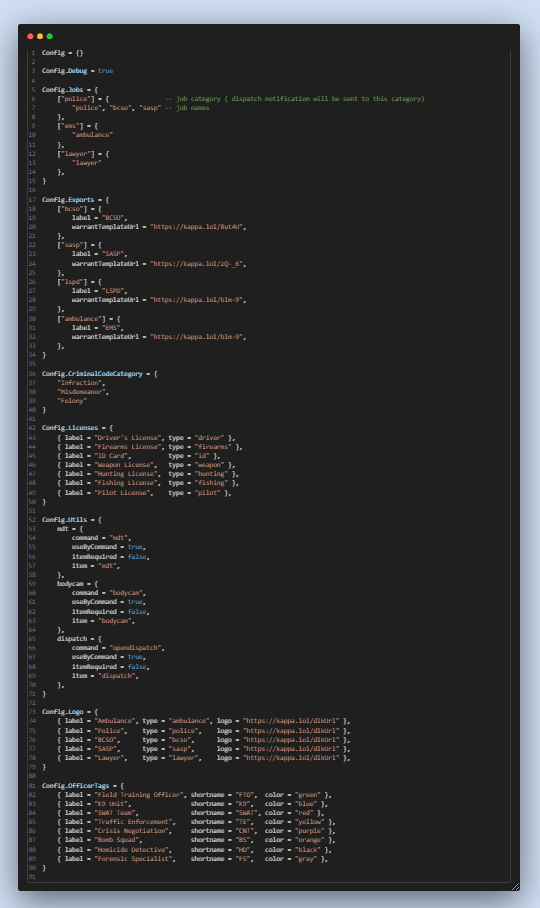
Config.Jobs
Defines job groups for dispatch notifications and UI filtering. No need to tag every job as true; just group them here.
Config.Jobs = {
    ["police"] = { "police", "bcso", "sasp" },
    ["ems"] = { "ambulance" },
    ["lawyer"] = { "lawyer" },
}
Want to add more? Example:
["doj"] = { "doj" }Used for:
- Filtering who gets dispatch alerts
- Pulling roles inside the MDT
- Keeping things organized by department
Config.Debug = true
Enables dev/debug mode, allows police-related features like:
- Fire shot alerts
- Dispatch pings
- Department notifications
Set to false for a clean/quiet environment.
Config.Exports
Sets department-specific info like labels and warrant template links.
["bcso"] = {
  label = "BCSO",
  warrantTemplateUrl = "https://kappa.lol/8ut4U"
}
Config.CriminalCodeCategory
Defines case severity types:
{ "Infraction", "Misdemeanor", "Felony" }Used in reports & legal sections.
Config.Licenses
All license types supported in reports and profiles.
{ label = "Driver's License", type = "driver" } Config.Utils
Quick commands to access tools like MDT, bodycam, and dispatch.
command = "mdt", itemRequired = falseSet to true to require an item for access.
Config.Logo
Department logos shown on the MDT.
{ label = "Police", type = "police", logo = "https://kappa.lol/dlkUrl" }Config.OfficerTags
Officer role tags with colored badges in the MDT.
{ label = "SWAT Team", shortname = "SWAT", color = "red" }Used in profiles and unit assignments.
This structure makes the MDT dynamic, clean, and easy to expand 🚔🩺📚
Add new groups, departments, or tools easily by updating this config.
Reports & FTO Categories
Define how officers and medics categorize incidents and evaluate training reports with these configurations.
Dispatch
Below are the configurable alerts available in the system. You can toggle them on or off. Do not add new keys under Config.Alerts unless explicitly supported by the dispatch system.