
Dispatch
Below are the configurable alerts available in the system. You can toggle them on or off. Do not add new keys under Config.Alerts unless explicitly supported by the dispatch system.
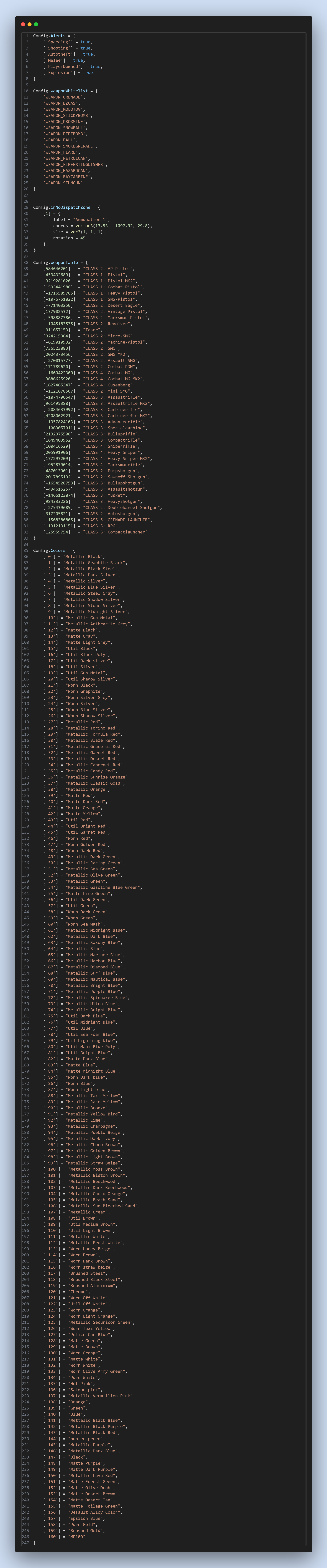
🚨 Config: Alerts
Config.Alerts = {
    ['Speeding'] = true,
    ['Shooting'] = true,
    ['Autotheft'] = true,
    ['Melee'] = true,
    ['PlayerDowned'] = true,
    ['Explosion'] = true
}
✅ Weapon Whitelist
These weapons will not trigger dispatch:
Config.WeaponWhitelist = {
    'WEAPON_GRENADE',
    'WEAPON_BZGAS',
    'WEAPON_MOLOTOV',
    'WEAPON_STICKYBOMB',
    'WEAPON_PROXMINE',
    'WEAPON_SNOWBALL',
    'WEAPON_PIPEBOMB',
    'WEAPON_BALL',
    'WEAPON_SMOKEGRENADE',
    'WEAPON_FLARE',
    'WEAPON_PETROLCAN',
    'WEAPON_FIREEXTINGUISHER',
    'WEAPON_HAZARDCAN',
    'WEAPON_RAYCARBINE',
    'WEAPON_STUNGUN'
}
🗺️ No Dispatch Zones
Config.inNoDispatchZone = {
    [1] = {
        label = "Ammunation 1",
        coords = vector3(13.53, -1097.92, 29.8),
        size = vec3(1, 1, 1),
        rotation = 45
    },
}
🔫 Weapon Classification Table
| Hash | Classification |
|---|---|
| 584646201 | CLASS 2: AP-Pistol |
| 453432689 | CLASS 1: Pistol |
| 3219281620 | CLASS 1: Pistol MK2 |
| ... | ... |
Tip: For long tables, consider breaking them into groups like CLASS 1, CLASS 2, etc., on separate pages or sections.
🎨 Vehicle Color IDs
You can list the first few like this:
Config.Colors = {
    ['0'] = "Metallic Black",
    ['1'] = "Metallic Graphite Black",
    ['2'] = "Metallic Black Steel",
    ['3'] = "Metallic Dark Silver",
    -- ...
}
For readability, consider splitting the full color list into:
- Metallic Colors
- Matte Colors
- Worn Colors
- Util Colors
- Special Finishes
Misc
This config file controls how the MDT behaves, which jobs are supported, and what tools are enabled for officers and EMS.
Permissions
This document outlines the permission configurations for various departments in the system. Each department has access to specific pages, with view and edit permissions defined.